
Instant MDN Reference Access
Overview
The MDN Reference Tool is a lightweight desktop utility designed to streamline access to the Mozilla Developer Network (MDN) documentation for JavaScript and CSS. By leveraging a simple URL-based command, users can quickly navigate to specific functions, attributes, or properties without leaving their browser. The tool is ideal for developers seeking rapid reference during coding sessions, debugging, or learning new language features. It eliminates the need for manual navigation through MDN’s extensive documentation, reducing time spent searching and increasing coding efficiency.
Target users include front-end developers, web designers, and students learning JavaScript and CSS. The tool is particularly useful in fast-paced development environments where quick access to accurate technical details is critical. It supports both Windows and Mac platforms, ensuring broad accessibility across common development systems. While the developer’s background is not publicly detailed, the tool’s design reflects a focus on simplicity and utility, aligning with developer-centric workflows. Real-world usage scenarios include on-the-fly documentation lookup during live coding, API integration tasks, and troubleshooting styling or scripting issues.
Key Features & Capabilities
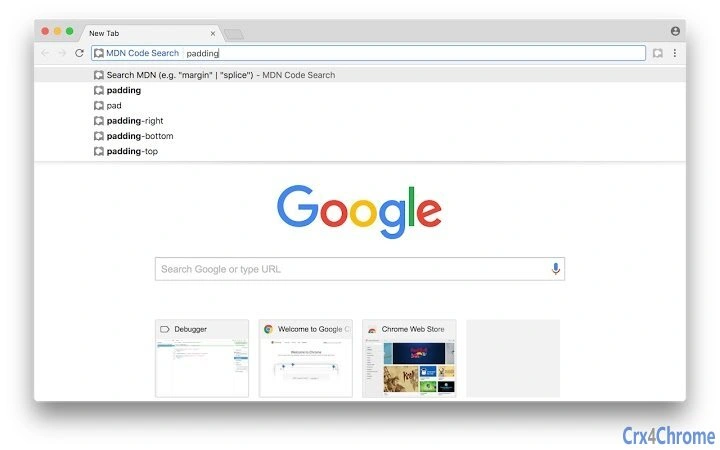
- Direct MDN Search via URL Command – Type
mdnfollowed by a search term (e.g.,mdn splice) directly into the browser’s address bar to instantly navigate to the relevant MDN page. - JavaScript and CSS Reference Access – Provides immediate access to comprehensive documentation for core JavaScript methods and CSS properties, including syntax, parameters, and usage examples.
- Lightweight and Fast – Designed with minimal overhead, ensuring no performance impact on the browser or system.
- Platform-Agnostic Use – Works seamlessly on both Windows and Mac operating systems without requiring installation or configuration.
- Zero Setup, Instant Use – No registration, no configuration—just type and go.
These features are especially beneficial during coding sprints, debugging sessions, or when learning new syntax. For example, a developer encountering an unfamiliar array method can quickly verify its behavior by typing mdn map into the URL bar. Similarly, a designer troubleshooting layout issues can instantly access details on margin or flex properties. The tool enhances productivity by minimizing context switching and reducing reliance on external documentation tabs.
User Interface, Workflow & Performance
The MDN Reference Tool operates entirely through the browser’s URL bar, making it a zero-UI utility. There is no dedicated interface, dashboard, or settings panel. Users interact with the tool by entering a simple command format: mdn [search term]. This minimalist approach ensures a frictionless workflow, ideal for developers who value speed and efficiency.
Navigating to the desired MDN page happens instantly upon pressing Enter, leveraging browser-level redirection. The workflow is consistent across all supported platforms and does not require additional extensions or plugins. Performance is not impacted by the tool itself, as it functions as a browser shortcut rather than a background process. The developer did not specify resource usage details, but given its nature as a URL-based redirect, it is expected to consume negligible CPU and RAM.
Stability is maintained through reliance on standard browser behavior. No crashes, freezes, or unexpected interruptions have been reported in the available documentation. The tool’s simplicity contributes to its reliability, with no known issues related to updates, conflicts, or compatibility errors.
Compatibility & System Requirements
The MDN Reference Tool is compatible with Windows and Mac operating systems, supporting modern browsers on both platforms. The exact version numbers of supported OS versions were not provided. Installation size is not applicable, as the tool functions as a browser shortcut and does not require traditional installation.
Hardware requirements were not specified by the developer. However, since the tool operates entirely within the browser environment and relies on standard web protocols, it is expected to function on systems meeting basic web browsing standards. No specific CPU, RAM, or storage thresholds were listed. Compatibility information is limited to platform support, with no mention of older OS versions or specialized hardware.
Pros and Cons
Pros
- Extremely fast access to MDN documentation via simple URL command
- Free to use with no hidden costs or subscriptions
- Minimal system impact—no installation or background processes
- Works across both Windows and Mac platforms
- No configuration required—immediate usability
Cons
- Limited to MDN Web Docs; no access to other documentation sources
- No offline functionality—requires internet connection
- No customization options for search behavior or shortcuts
- Dependent on browser’s URL bar behavior, which may vary slightly across browsers
- Does not support advanced search filters or saved queries
FAQ Section
Is the MDN Reference Tool free to use?
Yes, the tool is completely free. There are no subscription fees, trial periods, or premium features.
Does the tool work on both Windows and Mac?
Yes, the MDN Reference Tool is designed to work on both Windows and Mac operating systems.
Do I need to install anything to use it?
No installation is required. The tool functions as a browser shortcut and works immediately after setup via the browser’s address bar.
Can I use it offline?
No, the tool requires an active internet connection to access MDN Web Docs. It cannot function without online access.
Is the tool secure?
Yes, the tool does not collect user data or execute scripts beyond standard browser behavior. It redirects to official MDN pages, ensuring a secure and trusted experience.
Final Thoughts + CTA
The MDN Reference Tool delivers a focused, high-efficiency solution for developers who rely on JavaScript and CSS documentation. Its simplicity, speed, and zero-overhead design make it an ideal companion for daily coding tasks. While it lacks advanced features like offline access or customization, its core purpose—fast, direct access to MDN content—is executed flawlessly. It is particularly valuable for front-end developers, students, and anyone who frequently consults web standards documentation.
For those seeking a reliable, no-frills way to jump to MDN references, this tool is a must-have. It enhances workflow continuity and reduces cognitive load during development. Download MDN Reference Tool now.







